■Visual Basic編 2■
コードを書く前にWinSpecにアクセスできるようにProject-参照設定を行います(下図)。
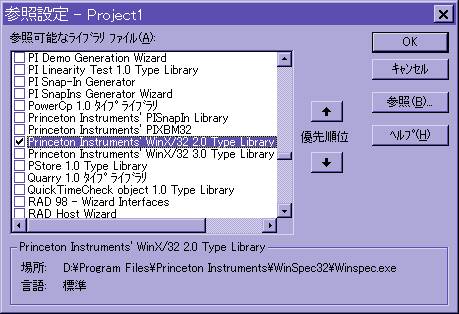
すると下のようなダイアログが出ますので、この中から”Princeton
Instruments’ WinX/32 2.0 Type Library”をチェックします(WinSpec2.4の場合)。もし、お使いのWinSpecが2.5以降であれば、”Princeton
Instruments’ WinX/32 3.0 Type Library”が現れてくるかもしれません。その場合は、そちらをお使いください。
そして、試しに以下のようなコードを追加してみます。
Private Sub Command1_Click()


  Dim theFrame As Variant

  Dim ex As New ExpSetup

  Dim dx As WINX32Lib.DocFile

  Dim bRes As Integer


  If ex.Start(dx) Then ' make sure detector started

    While ex.GetParam(EXP_RUNNING, bRes)

      DoEvents ' wait for detector to finish

    Wend

    dx.GetFrame 1, theFrame ' retrieve 1 image


    For i = LBound(theFrame, 1) To 5 ' for a few points

      s = s & theFrame(i, 0) & ", "

    Next i


    MsgBox s ' display a few points

  End If

End Sub

